2015-08-21
 365
365

1. Copy the MEYE_Android.apk to the mobile or download it from Google directly.
2. Click the program to install.
3. Click to run the program as shown in the picture on the right:
The functions of the buttons are as below:
| Function Button | Name | Function Description |

| Play | Program connects the device and start to play the video |

| Snapshot | Capture the current image (the pictures are saved in the picture directory of the mobile phone by default) |

| Setting | Set IP address of the NVR or DDNS, port, user name, and password and device name. |

| Last Group | Can select the channel of last group |

| Next Group | Can select the channel of next group |

| About | About the information. |

| Select Channel | Select to play the video of any channel of the device. Coordinating with the Ў±Next GroupЎ±, you can switch to 8ch or 16ch. |

| PTZ Control | Control PTZ up, down, left and right. |

| Zoom | Zoom in and zoom out |

| Focal Length | Increase or decrease the focal length |

| Iris | Increase or decrease the iris |
4. Use for the first time, you need to do the following settings:
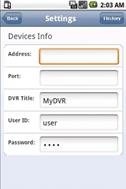 Address: The public IP address or DDNS of the
NVR;
Port: The server port of the NVR;
NVR Title: The device name of the NVR, which is used to differentiate different devices;
User ID: Same as the user name on IE;
Password: Same as the password on IE.
 : Return button.